How QR codes work: finder patterns, modules, and data
How a QR code stores data and how your phone reads it: finder patterns, modules, encoding modes, error correction, and masking, explained step by step.
A QR code works by storing data as a grid of dark and light squares, called modules, that a camera can read in any direction. Three large squares in the corners tell the phone where the code is and which way up it is. The rest of the grid holds your content, converted to bits and protected by error correction, so the code can still be read when part of it is dirty or covered.
This guide goes one level deeper than what a QR code is: what each part of the pattern does, how text becomes squares, and what your phone does in the split second it takes to read one. The rules all come from the international standard, ISO/IEC 18004, and from Denso Wave, the company that invented the QR code in 1994.
The parts of a QR code
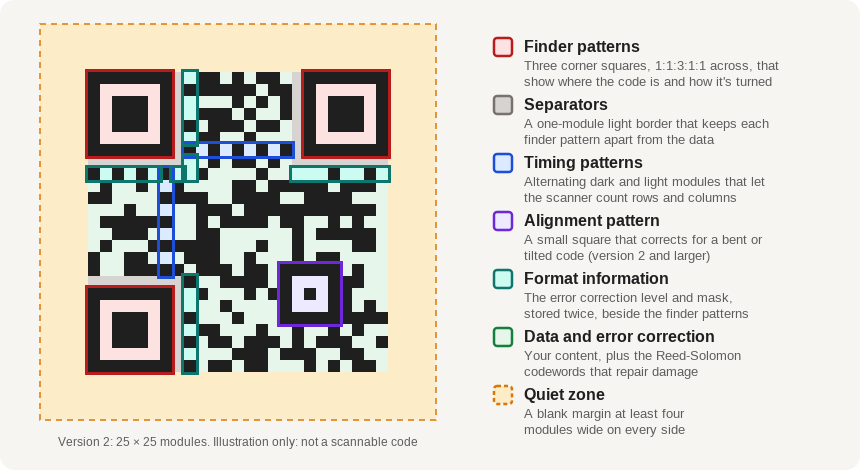
Every QR code has the same building blocks:
- Finder patterns. The three big squares in the top-left, top-right, and bottom-left corners. Each is 7 × 7 modules: a dark ring, a light ring, and a dark 3 × 3 center. Their proportions (1:1:3:1:1 across the middle) are rare in ordinary images, so a scanner can spot them quickly from any angle.
- Separators. A one-module light strip around each finder pattern, so it stands out from the data next to it.
- Timing patterns. Two lines of alternating dark and light modules joining the finder patterns. They tell the scanner how big each module is, so it can map the grid even when the code is tilted or slightly curved.
- Alignment patterns. Smaller 5 × 5 squares that appear from version 2 upward. They help correct for distortion, such as a code printed on a curved bottle or photographed at an angle.
- Format information. Fifteen modules next to the finder patterns that record the error correction level and the mask pattern (explained below). They’re stored twice, so one damaged copy isn’t fatal.
- Version information. From version 7 upward, two small blocks record the code’s size.
- The data area. Everything left over. It holds your content and the error correction data.
- The quiet zone. A blank margin around the whole code, at least four modules wide, that separates it from text and graphics around it.
Versions: why some codes have more squares
QR codes come in 40 sizes, called versions. Version 1 is 21 × 21 modules, and each version adds 4 modules per side, up to version 40 at 177 × 177 (Denso Wave). The version isn’t something you usually pick. The app that makes the code chooses the smallest version that fits your content at the error correction level you chose.
That’s why a short link makes a simple, chunky code and a long one makes a dense code. How much data a QR code can hold has the full numbers.
How text becomes squares
When an app makes a QR code, it follows the same steps every time.
1. Choose an encoding mode
The standard has several modes, each packing a different kind of content efficiently:
| Mode | Characters | Typical use |
|---|---|---|
| Numeric | Digits 0–9 | Phone numbers, IDs |
| Alphanumeric | 0–9, A–Z (uppercase), space, and $ % * + - . / : |
Short uppercase codes |
| Byte | Any bytes, usually UTF-8 text | Links, Wi-Fi details, most real content |
| Kanji | Japanese characters | Japanese text |
Numeric mode fits about three digits into every 10 bits, so it holds far more than byte mode, which uses 8 bits per character. A code can switch modes partway through to save space.
2. Add error correction
The data is split into blocks, and each block gets extra Reed-Solomon error correction codewords. These are calculated from the data so that a scanner can rebuild missing or misread parts. You choose how much protection to add: level L, M, Q, or H, recovering roughly 7%, 15%, 25%, or 30% of the code (Denso Wave). More protection means more modules. QR code error correction levels explains how to choose.
3. Place the bits
The data and error correction codewords are interleaved, so a single scratch damages a little of several blocks rather than all of one. Then the bits are laid into the data area in a zigzag, two columns at a time, starting from the bottom-right corner and working around the fixed patterns.
4. Apply a mask
Raw data can accidentally create patterns that confuse a scanner, such as large blank areas or shapes that look like a finder pattern. So the encoder tries eight mask patterns, each of which flips modules in a regular pattern, scores the results, and keeps the one that’s easiest to read. The chosen mask is recorded in the format information, so the scanner can undo it.
What your phone does when it scans
Reading a code reverses those steps, usually in a fraction of a second:
- Find the code. The scanner looks for the three finder patterns in the camera image.
- Work out the geometry. From the finder, timing, and alignment patterns, it calculates the module size, the rotation, and any perspective distortion.
- Sample the grid. It decides whether each module is dark or light.
- Read the format information to learn the error correction level and the mask, then remove the mask.
- Correct errors. Reed-Solomon decoding fixes misread or missing modules, up to the level’s limit.
- Decode the content from bits back into text, then show it to you.
All of this happens on the phone. Reading a QR code doesn’t need the internet; opening what it contains, such as a website, might. Scanning without internet covers what works offline.
Common questions
Why can a QR code be scanned upside down?
The three finder patterns sit in three of the four corners. Wherever the empty corner is, the scanner knows which way up the code is, so it can read it at any rotation.
Why do QR codes still work with a logo in the middle?
Error correction can rebuild the modules the logo covers, as long as the logo stays within what the chosen level can recover and doesn’t touch the finder patterns. How to add a logo without breaking the code gives safe sizes.
Can two different QR codes contain the same thing?
Yes. The same link can be encoded at different versions, error correction levels, and masks, and each produces a different-looking pattern. They all scan to the same content.
Does the pattern contain anything hidden?
No. A QR code contains only the text it was made with, plus the format and error correction data needed to read it. There’s no hidden tracking inside the pattern. A code can, however, contain a link to a site that tracks visits.
A note on EveryQR
EveryQR, the Android app I make, follows these same rules when it creates codes: it keeps the finder patterns whole, lets you set the quiet zone to the standard four modules (recommended for print) or wider, and picks the error correction level for you unless you choose one in Settings. Before you export a styled code, its readability check reads the design back to confirm it still scans.
Related guides
- What is a QR code? A plain-English guide
- QR code error correction levels explained
- How much data can a QR code hold?
Browse all QR code guides.