What is a QR code? A plain-English guide
A QR code is a square barcode a phone camera reads to open a link, join Wi-Fi, or pay. How QR codes work, what they hold, where they came from, and safety tips.
A QR code is a square barcode that stores information, usually a web address, in a pattern of black and white squares. When you point a phone camera at it, the phone reads the pattern and offers to open the link, join a Wi-Fi network, pay a shop, or save a contact. QR stands for Quick Response.
QR codes were invented in 1994 by Denso Wave, a Japanese company in the Toyota group, to track car parts during manufacturing. Today they’re on menus, tickets, product packaging, and payment counters across the world.
How a QR code works
A QR code is a grid of small squares called modules. Each dark or light module is a bit of data. Some parts of the grid have fixed jobs:
- Three large squares in the corners tell the camera where the code is, how big it is, and which way up it is. That’s why a QR code can be scanned at an angle or upside down.
- The data area holds your content, plus extra error correction data.
- The blank margin (the quiet zone) separates the code from whatever is around it.
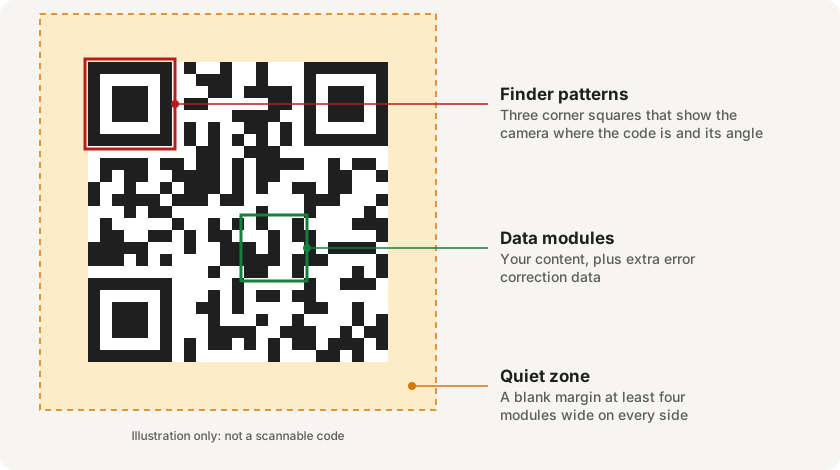
When you scan a code, the phone finds the corner squares, reads each module, and decodes the content. It’s done entirely by the phone; reading a code doesn’t need the internet. What happens next, such as opening a website, might.
What can a QR code hold?
A QR code holds text. Phones recognize certain kinds of text and offer a matching action:
| Content | What your phone does |
|---|---|
| A web address | Offers to open it in a browser |
| Wi-Fi details | Offers to join the network |
| A UPI payment request | Opens your payment app (you approve with your PIN) |
| Contact details | Offers to save a contact |
| A phone number or email | Offers to call or write |
| Plain text | Shows the text |
To make one yourself, see how to make a QR code for free, or the step-by-step guides for Wi-Fi QR codes and WhatsApp QR codes.
The largest QR code can hold up to 7,089 digits, or 4,296 letters and numbers, or 2,953 bytes of other data, according to Denso Wave’s version table. Most real codes hold far less, often just a short link.
Why QR codes still work when damaged
QR codes include error correction. The code stores extra data so it can be read even if part of it is dirty, torn, or covered. There are four levels, which can restore roughly 7%, 15%, 25%, or 30% of the data (Denso Wave). This is also why a small logo can sit in the middle of a code.
QR codes vs barcodes
A traditional barcode, like the one on a packet of biscuits, stores data in one direction, as a row of lines, and usually holds a short number. A QR code stores data in two directions, across and down, so it holds much more and can be read from any angle.
Common questions
Do QR codes expire?
A basic (static) QR code doesn’t expire. It works as long as its content is valid, for example while the website it links to is online. Some codes made with online services are dynamic and depend on that service. See static vs dynamic QR codes, and do QR codes expire? for the full answer.
Is it free to make or use QR codes?
Yes. “QR Code” is a registered trademark of Denso Wave, but the company’s FAQ says you don’t need a license to use QR codes made to the standard, including for commercial use, so anyone can create and use them.
How do I scan a QR code?
On most phones, open the camera and point it at the code. If nothing happens, see how to scan a QR code on Android.
Are QR codes safe?
A QR code is just data; the risk is where it leads. A code can take you to a fake website, a scam known as QR code phishing, or to a payment request. Read the link before you open it, and never enter your UPI PIN to receive money. Are QR codes safe? explains the real risks.
Who sets the standard?
QR codes are defined by the international standard ISO/IEC 18004; the current edition was published in 2024.
Related guides
To scan and create QR codes on Android, I make EveryQR: it reads codes on your phone, works offline, and needs no account. Browse all QR code guides.