Static vs dynamic QR codes: which should you use?
Static QR codes store your content in the code; dynamic codes point to a link you can change. How each works, the trade-offs, and which to choose for print.
A static QR code stores your content, such as a web address or Wi-Fi password, directly in the pattern of the code. A dynamic QR code stores a short link to a redirect service, which then forwards people to your real destination. Static codes can’t be changed after printing but work without any service; dynamic codes can be edited and tracked but depend on the service that runs them.
Neither is better in general. The right choice depends on whether you’ll need to change the destination later.
How static QR codes work
With a static code, scanning reads the content straight from the code. If the code contains https://example.com/menu, the phone opens that address directly. Nothing sits in between.
That means:
- No account or subscription is needed to keep it working.
- It keeps working as long as the content is valid. A static link code works for as long as the web page is online. A Wi-Fi code works until you change the password.
- You can’t edit it. To change the content, you make and print a new code.
- There’s no scan tracking. No one counts how many people scanned it, because nothing sits between the scan and the destination.
Static codes suit anything that won’t change: your website’s home page, a Wi-Fi network, a contact card, a fixed document link.
How dynamic QR codes work
A dynamic code contains a short link that belongs to a QR code service, something like https://qr-service.example/abc123. When someone scans it, their phone visits the service, which looks up where abc123 should go and forwards them there.
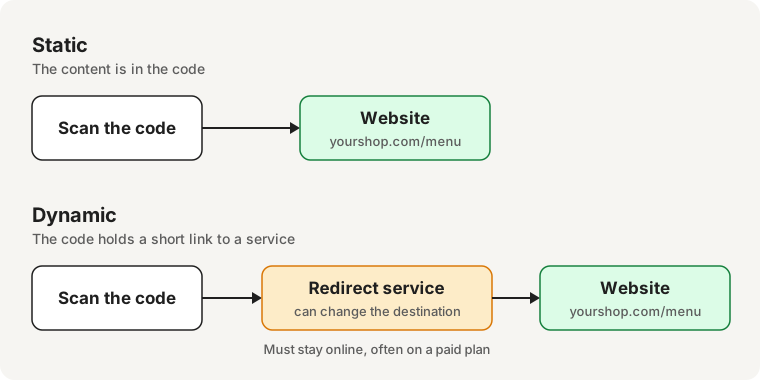
That extra step gives you:
- An editable destination. You can point the same printed code somewhere else later.
- Scan statistics. The service can count scans, and often records time, approximate location, and device type.
- Shorter content. The short link makes a simpler code, even if your real web address is long.
The trade-offs:
- It depends on the service. If the service shuts down, or your plan ends, the code may stop working or show a different page.
- Many services charge a monthly or yearly fee to keep dynamic codes active.
- Privacy. Every scan passes through the service’s server. Scan counts are often the point of a dynamic code, so check the service’s privacy policy to see what it records about the people scanning.
- Trust. People who check codes before opening them see an unfamiliar short-link address rather than your own domain.
Static vs dynamic at a glance
| Static | Dynamic | |
|---|---|---|
| Where the content lives | In the code | On a redirect service |
| Change after printing | No | Yes |
| Needs a service or plan | No | Yes |
| Scan statistics | No | Usually |
| Works if the service closes | Yes, if the content is still valid | No |
Which should you choose?
- Choose static for content that won’t change, for anything you want to keep working without a subscription, and for private content such as Wi-Fi passwords.
- Choose dynamic if you’ll print in large numbers and expect the destination to change, such as a campaign landing page, or if you need scan statistics.
- A middle path: use a static code that points to a page you control, such as
yourshop.com/menu. You can update the page whenever you like without reprinting the code, and you’re not tied to a QR service.
Common questions
Do static QR codes expire?
No. A static code has no expiry date built in. It stops being useful only when its content does, for example when the website it links to goes offline. More in Do QR codes expire?
Can I turn a static code into a dynamic one?
No. The content is fixed in the printed pattern. You would make a new code that holds a redirect link instead.
How can I tell which kind a code is?
Scan it and look at the address before opening it. If it’s the business’s own website, it’s probably static. If it’s a short link on a QR service’s domain, it’s probably dynamic.
Are dynamic QR codes less safe?
Not by themselves. But because the destination can change after printing, you’re trusting whoever controls the redirect. How to check a QR code before you open it explains what to look for.
Related guides
Codes you make in EveryQR are static: the information is stored in the code itself, so it keeps working as long as that information is still valid. No subscription is needed to keep them working. Browse all QR code guides.